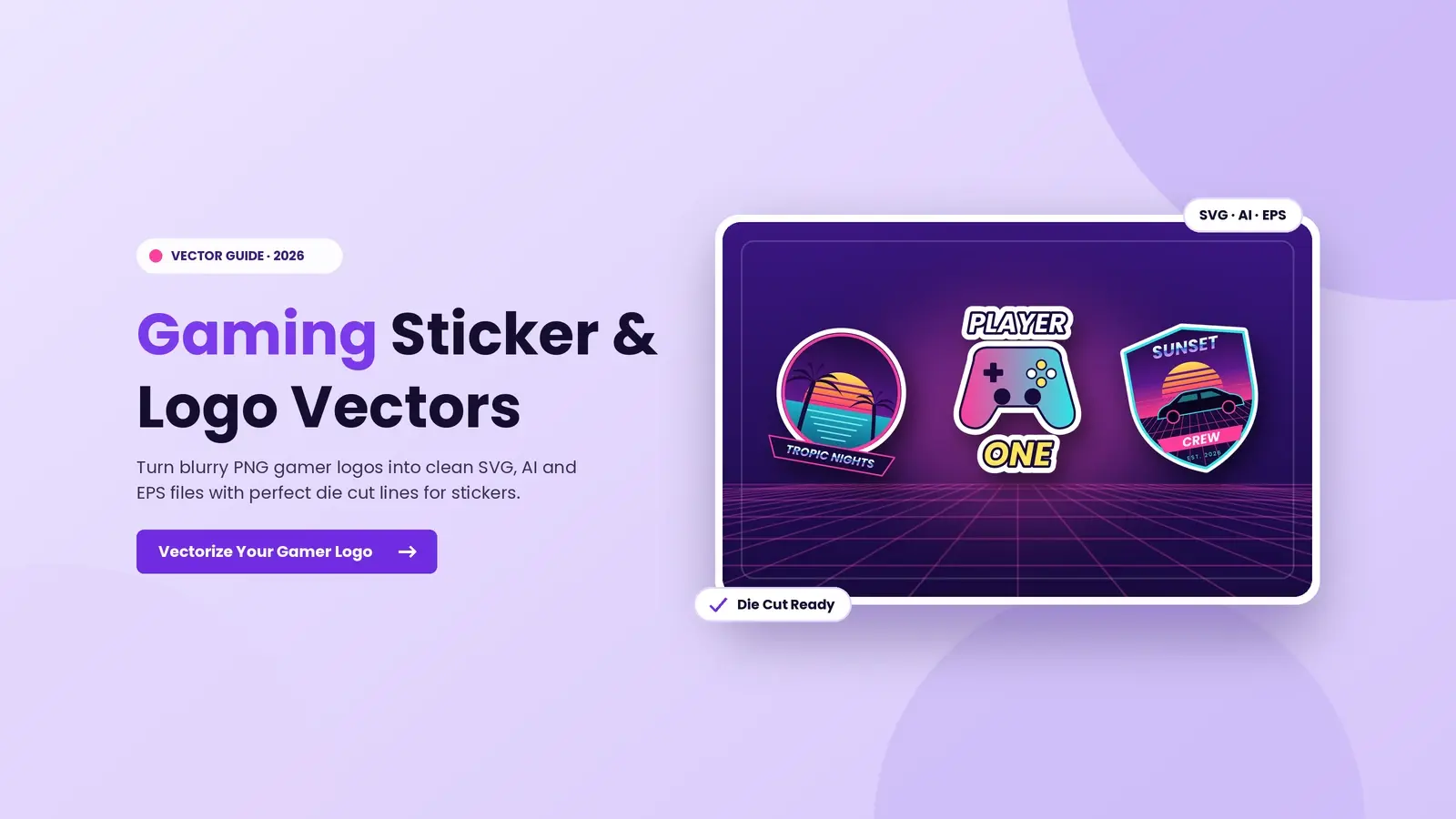
Learn how to turn blurry gamer logos and stream emotes into clean vector files. This guide covers PNG to SVG conversion, die cut lines, bleed and file setup for gaming stickers and merch.
Every gamer, streamer and esports team wants merch, and stickers are usually the first thing they order. The problem? Most gaming logos start life as a blurry PNG, a Discord avatar or a screenshot. Print that on a sticker and you get fuzzy edges, jagged lines and a die cut that does not follow the design.
The fix is vectorization: rebuilding the logo as clean SVG, AI or EPS artwork that can be scaled to any size without losing quality. With the GTA 6 launch pushing retro neon gaming merch into the spotlight, this guide shows you how to prepare gaming logos and stickers the professional way.
Raster vs Vector: Why It Matters for Gaming Stickers
A raster image (PNG, JPG, WEBP) is made of pixels. Enlarge it and it gets blurry. A vector file (SVG, AI, EPS, PDF) is made of mathematical paths, so it stays sharp from a tiny laptop sticker to a giant banner. For a deeper comparison, read our guide on raster vs vector logo files.
| Feature | Raster (PNG / JPG) | Vector (SVG / AI / EPS) |
|---|---|---|
| Scaling | Gets blurry when enlarged | Sharp at any size |
| Die cut line | Hard to create accurately | Exact contour from the paths |
| Color control | Mixed pixels, hard to match | Solid, editable color fills |
| Cutting machines | Need manual tracing | Ready for Cricut, Silhouette and plotters |
| Best use | Photos, social posts | Stickers, logos, merch, signs |
Who Needs Gaming Logo Vectorization?
- Twitch and YouTube streamers: Channel logos and emotes turned into stickers, hoodies and mousepads.
- Esports teams: Team crests that must look sharp on jerseys, banners and sponsor boards.
- Gaming clans and Discord servers: Community logos for sticker packs and giveaways.
- Sticker shops and Etsy sellers: Retro, neon and synthwave designs that need clean cut files.
- Gaming cafés and events: Logos for launch parties, tournaments and merch tables.
Trending Gaming Sticker Styles in 2026
The GTA 6 inspired design trend has made retro neon the hottest look in gaming merch right now. The styles selling best:
1. Neon Sunset Badges
Striped sunsets, palm trees and ocean lines inside a round or shield badge. They work as stickers, patches and shirt prints.
2. Synthwave Road and Grid Designs
A glowing grid floor, a road running to the horizon and chrome lettering. Perfect for streamers with a retro channel theme.
3. Controller and Arcade Icons
Gamepads, joysticks, pixel hearts and "PLAYER ONE" style text with thick outlines and a white sticker border.
4. Crew and Clan Crests
Shields with a team name, a year and a simple icon. These are popular for esports teams and Discord communities.
Want ready-made inspiration? Browse our free designs section for original retro neon artwork.
How We Vectorize a Gaming Logo: Step by Step
- Review the source file: We check resolution, colors and small details like thin outlines or tiny text.
- Redraw, not auto-trace: Auto-trace tools create lumpy curves and hundreds of extra points. We redraw every shape by hand with clean Bezier curves.
- Rebuild the lettering: We match the font or redraw custom lettering so edges are crisp.
- Set solid colors: Glows and gradients are converted into clean color bands or proper vector gradients, with Pantone or CMYK values if needed.
- Create the cut line: We add a die cut or kiss cut contour on its own layer with an offset border.
- Add bleed: Artwork extends past the cut line so no white edges appear after cutting.
- Export all formats: You receive AI, EPS, SVG, PDF and a high resolution PNG.
Sticker File Setup Checklist
| Setting | Recommended value |
|---|---|
| White sticker border | 2 to 4 mm around the design |
| Bleed | At least 1.5 to 3 mm past the cut line |
| Cut line | Single path on a separate layer, named "CutContour" |
| Minimum line thickness | 0.5 mm (thinner lines may not print or cut cleanly) |
| Minimum text height | About 2 mm for small stickers |
| Color mode | CMYK for print, RGB for screen previews |
| Fonts | Converted to outlines |
Printing with UV DTF instead? Check our UV DTF stickers file setup guide for the extra white and varnish layers.
Die Cut vs Kiss Cut Stickers
- Die cut: The blade cuts through the vinyl and the backing, so the sticker is shaped exactly like the design. Best for individual gamer logo stickers.
- Kiss cut: The blade cuts only the vinyl and leaves the backing as a square or rectangle. Best for sticker sheets and packs.
- Print and cut: For Cricut or Silhouette Cameo, you need a PNG for printing plus a clean SVG cut path that matches it exactly.
We prepare files for all three methods. Learn more about our die cutting design service and custom sticker design service.
Common Mistakes With Gaming Sticker Files
- Using a screenshot of the logo: Screenshots are low resolution and full of compression noise.
- Auto-tracing in a hurry: It creates wobbly edges that look cheap when printed large.
- Tiny details: Hairline outlines and small text disappear on a 2 inch sticker.
- No bleed: Thin white slivers show around the edges after cutting.
- Glow effects left as blur: Soft glows print muddy. Convert them into solid color outlines.
- Copying game logos: Official game logos and characters are trademarked. Use your own logo or original artwork.
One Vector File, Many Products
Once your gaming logo is a clean vector, you can use it everywhere: stickers, DTF shirt prints, screen printing, laser engraving, signs and even embroidery. Need it stitched on hoodies and caps too? Our vector design team and embroidery digitizers work together so your logo looks the same on every product.
Get Your Gaming Logo Vectorized
Send us your PNG, JPG, screenshot or even a sketch. We will return clean AI, EPS, SVG and PDF files with an optional die cut line, ready for stickers and merch. You get a confirmed price before we start, fast turnaround and unlimited revisions.
See our pricing or send us your gaming logo today.