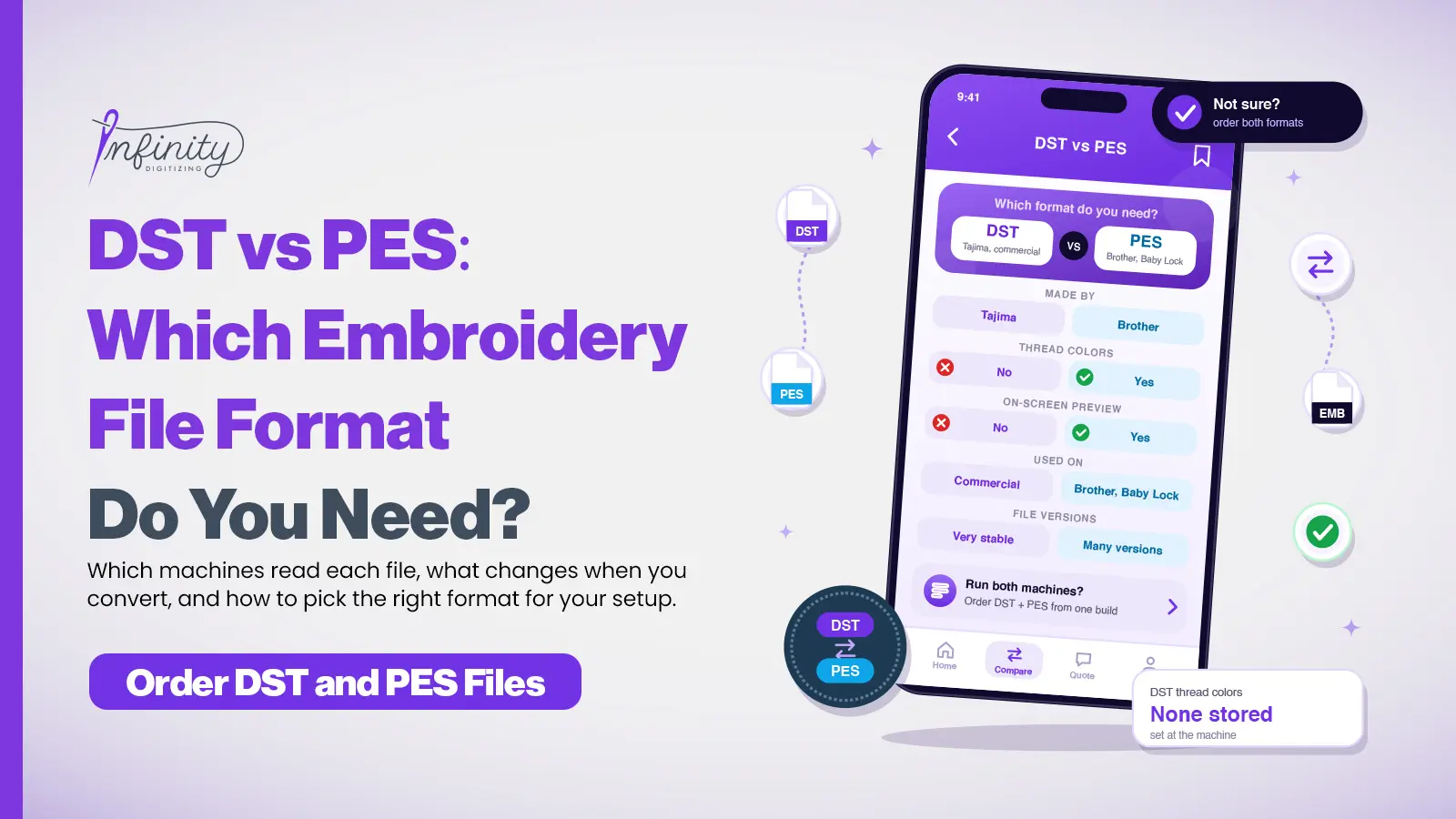
Most people searching DST vs PES need it fast: if your machine is a Tajima or another commercial multi-head, use DST.
Most people searching DST vs PES need it fast: if your machine is a Tajima or another commercial multi-head, use DST. If your machine is a Brother or Baby Lock, use PES. If you run both, get both.
Neither format is “better” in general. Each is better for a specific machine and a specific kind of work. The rest of this guide explains why, so you can choose with confidence, avoid the most common conversion problems, and know what to ask for when you order a design.
DST vs PES: What’s the Difference?
The difference between DST and PES comes down to three things: who made the format, which machines read it, and how much information it stores.
- DST is Tajima’s format. It is lean, stitch-focused, and read by almost every commercial embroidery machine. It does not store real thread colors.
- PES is Brother’s format, also used by Baby Lock. It stores stitch data plus thread colors, a preview image, and design details the machine shows on its screen.
Put simply, DST is the production workhorse, and PES is the more descriptive file built for machines where the operator follows on-screen color prompts. Both carry the same core thing: the stitches your machine will sew.
What Is a DST Embroidery File?
A DST embroidery file is the native stitch format of Tajima, one of the oldest and most widely used commercial embroidery machine makers. Because Tajima set the early standard for multi-head production, DST became the shared language of commercial embroidery. DST file is essentially a long list of movements. Each record tells the machine how far to move the needle and whether to stitch, jump, or change color. A short header at the start lists the design name, total stitch count, number of color changes, and the design’s dimensions.
What makes DST distinctive is how little else it carries. There is no thread color, no thread brand, and no preview image of what the colors should look like. The file says “change to the next needle here,” not “change to red.” The operator decides which thread sits on which needle. That simplicity is a strength in production. DST files are small, stable, and read reliably across machines from many brands, which is why they remain the default for contract shops.
What Is a PES Embroidery File?
A PES embroidery file is the native format for Brother embroidery machines, from single-needle home models to multi-needle commercial units. Baby Lock machines, which share much of Brother’s technology, use PES as well. PES carries more than stitches. Along with the stitch data, it stores the thread color for each segment of the design, a color list, and an embedded preview that the machine displays on its screen. When you load a PES file on a Brother, you see the design in its intended colors and get a prompt for each thread change.
PES has also changed over time. Brother has released many versions of the format alongside updates to its software and machines. A file saved in a newer PES version may not open on an older machine, even though nothing is wrong with the design itself. Files saved from Brother’s own design software can also keep some design information that the same software can reopen. On the machine, though, and in most other programs, PES behaves as a stitch file.
DST vs PES: Key Differences
This is the comparison most readers come for. Here is how the two formats line up.
|
Feature |
DST |
PES |
|
Origin |
Tajima |
Brother (also used by Baby Lock) |
|
Main users |
Commercial shops, contract embroiderers, multi-head machines |
Home embroiderers, small businesses, Brother and Baby Lock owners |
|
Stores stitch data |
Yes |
Yes |
|
Stores thread colors |
No, only color change points |
Yes |
|
On-screen preview |
No real color preview |
Yes, preview with intended colors |
|
Trims |
Signaled through jump sequences, read by the machine |
Stored as machine commands |
|
File versions |
Very stable, one long-standing structure |
Many versions; newer files may not open on older machines |
|
Cross-brand support |
Read by most commercial machines |
Mainly Brother and Baby Lock |
|
Editing |
Stitch-level only |
Stitch-level in most software |
|
Best for |
Production on multi-needle commercial machines |
Brother and Baby Lock machines, color-guided sewing |
|
Typical problem |
Wrong colors shown on screen |
Version not supported by older machine |
The quick takeaway
DST wins on compatibility across commercial machines. PES wins on information, especially color. Which matters more depends entirely on the machine in front of you.
Which Embroidery Machines Use DST?
DST is the most widely supported commercial format. Machines that commonly read DST include:
- Tajima, the format’s original home
- Barudan, SWF, Happy, and Ricoma multi-needle and multi-head machines
- Most contract shops and production floors in the US, regardless of brand mix
Many Brother and Baby Lock multi-needle machines can also open DST files, and some single-needle models can too. That flexibility is one reason DST is a safe default when you are sending a design to someone and are not sure what they run.
If you need embroidery files for Tajima machines or another commercial setup, DST is almost always the right request.
Which Embroidery Machines Use PES?
PES is the native format for:
- Brother embroidery machines, including single-needle home machines and the multi-needle PR series
- Baby Lock embroidery machines, across single-needle and multi-needle models
PES is the format most often sold with ready-made designs aimed at home embroiderers, and it is the default choice for small businesses and Etsy sellers running Brother or Baby Lock equipment.
When ordering embroidery files for Brother machines, ask for PES first. If your model is older, mention the model number so the file can be saved in a compatible PES version.
DST vs PES: Compatibility and Machine Requirements
Embroidery file compatibility is where most frustration happens. Here are the questions people ask most.
Can DST files work on Brother machines?
Often, yes. Many Brother models, especially multi-needle machines and many recent single-needle machines, can read DST. The design will sew, but the screen will show default colors, because DST holds no color data. You will need to choose threads yourself. Check your machine’s manual for its supported file list before relying on DST.
Can PES files work on Tajima machines?
Generally, no. Tajima and most commercial multi-heads are built around DST and do not read PES directly. A PES design has to be converted to DST before it can run on a Tajima.
Why won’t my embroidery machine read the file?
When an embroidery file is not compatible with a machine, the cause is usually one of four things:
- Wrong format. The machine does not support that file type at all.
- Wrong version. Common with PES; the file was saved in a newer version than the machine supports.
- Design too large. The design exceeds the largest hoop or sewing field the machine allows.
- Storage issues. The USB stick is formatted in a way the machine cannot read, the file is inside a folder the machine does not open, or the file name is too long.
Before blaming the design, check those four. They solve most “my machine won’t read the file” problems in minutes.
What Information Does Each File Store?
Understanding what is inside each file explains almost every DST vs PES question.
Inside a DST file
- Stitch movements, jumps, and color change points
- Stitch count, number of colors, and design dimensions in the header
- Trim signals, typically as a sequence of jumps the machine reads as a cut
Inside a PES file
- Stitch movements and commands
- Thread colors for each segment, plus a color list
- A preview image shown on the machine screen
- Design size and related machine information
What neither file stores well
Neither DST nor PES is a true editable design file. Once a design is saved as stitches, the decisions behind it are gone: stitch type, stitch density, underlay, pull compensation, and stitch direction all exist only as finished stitch points.
That is why large resizing, lettering changes, or adapting a design for a different garment should be done in the original working file, such as a Wilcom or Hatch Embroidery EMB file, and then exported again as DST or PES. Resizing a stitch file beyond roughly 10 to 15 percent usually causes gaps or overly dense areas.
Can You Convert DST to PES or PES to DST?
Yes. Most embroidery software can read one format and save it as the other. Converting is common, quick, and often works well for simple designs.
When you convert DST to PES
- Colors are guessed. DST has no thread colors, so the new PES file receives default colors. The design sews correctly, but the screen shows the wrong palette until someone assigns real colors.
- Trims may need checking. DST trims are signaled through jump sequences. Some converters translate them cleanly into PES trims. Others leave jumps that the Brother machine sews as long threads you have to cut by hand.
- Hoop fit matters. Commercial DST files are often larger than home Brother hoops allow.
When you convert PES to DST
- Color information is dropped, because DST cannot store it. Keep a note of the intended colors.
- Very long stitches may be split into extra jumps, since formats handle stitch length limits differently.
- Some machine-specific commands may not carry over exactly.
Does File Conversion Affect Embroidery Quality?
This is one of the most important questions in the whole DST vs PES debate, and the honest answer is: conversion changes the container, not the quality of the stitches inside.
A well-digitized design converted from PES to DST will sew just as well on a Tajima, as long as trims and stops come through correctly. A poorly digitized design will sew just as poorly after conversion. Converting cannot add underlay that was never there, fix density that is too high, or correct stitch direction.
Quality problems after conversion usually come from three places:
- The original file was weak. Conversion simply passed the flaws along.
- The file was built for a different job. A PES file digitized for a home machine sewing a cotton tee may be too dense, too slow, or poorly sequenced for a high-speed multi-head running caps.
- Commands did not translate cleanly. Missing trims or extra jumps add hand trimming and slow production.
So does converting embroidery files affect quality? The stitches stay the same, but the result can still disappoint if the file was never right for the new machine, garment, or speed. A careful embroidery file conversion service checks colors, trims, size, and stitch length after converting rather than trusting an automatic batch convert.
Common DST vs PES Mistakes
These are the errors that cause most wasted time with these two formats:
- Assuming a DST file has colors. Operators load a DST, see bright defaults on screen, and thread the machine to match. Always confirm the real thread colors from the customer or the design proof.
- Sending only PES to a contract shop. Many commercial shops cannot open it. Send DST, or both.
- Saving PES in the newest version for an older machine. The machine refuses the file and the design gets blamed. Ask for a version that matches your model.
- Resizing a DST or PES heavily on the machine. On-screen resizing spreads or squeezes existing stitches. Small adjustments are fine; large ones need a rebuild from the working file.
- Converting a home-machine PES for high-speed production. It loads, but density and sequence were never planned for a multi-head running at speed.
- Ignoring trims after converting. A converted file with missing trims leaves jump threads on every piece.
How to Check Which Format Your Machine Supports
Do not guess. Use one of these:
- The machine manual. Look for a section called “embroidery data,” “compatible files,” or “file formats.”
- The machine screen. Many machines only list files they can read when browsing a USB stick. If a file does not appear, the format or version may not be supported.
- The manufacturer’s website. Search your exact model number with “supported embroidery formats.”
- Your digitizer. Share the model number and a good provider will deliver the right format and version.
Which Format Should You Choose for Your Embroidery Machine?
Should you use DST or PES? Match your situation to the scenarios below.
|
Your situation |
Choose |
|
You run a Tajima, Barudan, SWF, Happy, or Ricoma |
DST |
|
You run a Brother or Baby Lock machine |
PES |
|
You send work to a contract embroiderer |
DST, unless they say otherwise |
|
You run Brother for samples and a commercial machine for production |
Both DST and PES |
|
You sell designs to home embroiderers |
PES, often alongside DST |
|
You have an older Brother model |
PES, saved in a version your machine supports |
|
You may need to edit or resize later |
Your machine format plus the editable working file |
The best approach when you are unsure
Order both. Saving a design in DST and PES at the same time costs little and removes guesswork later. When ordering, always share:
- Your machine brand and model
- The garment and finished size
- Every format you need
The embroidery file formats guide lists the formats each machine brand uses, so you can confirm before you order.
DST vs PES for Commercial Embroidery Production
For commercial embroidery, DST is the standard for good reasons.
- Multi-head compatibility. Production floors often mix brands. DST runs across nearly all of them, so one file works everywhere.
- Stability. DST’s structure has stayed consistent for decades. There are no version surprises when a file moves between machines or shops.
- Operator control. On a multi-needle machine, threads stay loaded on the same needles across many jobs. Operators assign needles to colors at the machine, so DST’s lack of color data rarely matters in production.
- Smaller, simpler files. Less data means fewer things to break when files move between software, machines, and customers.
PES still has a place in commercial work. Many small businesses run Brother or Baby Lock multi-needle machines for production, and PES is the natural choice there. Shops that use a Brother for test sew-outs and a Tajima for the order benefit from having both files from the same build.
A real-world example
A uniform supplier in Georgia runs two Tajima six-head machines and keeps one Brother multi-needle for quick samples. For every new logo, they order the design once and receive DST and PES files from the same build. The sales team sews a sample on the Brother using the PES file, with correct colors on screen. Once the customer approves, production runs the DST on the Tajimas. Both files come from the same digitizing, so the sample matches the order exactly, and nothing needs converting.
That is the cleanest way to avoid DST vs PES problems altogether: order machine-ready embroidery files in every format you use, from one well-built design. For steady volume like this, the B2B digitizing program keeps every logo delivered in the formats each machine needs.
What to Send When Ordering Your Files
A clear order gets the right file the first time:
- Clean artwork, ideally vector. The art requirements page explains what works best.
- Machine brand and model, plus every format you need.
- Garment and placement, such as a left chest polo or a structured cap front.
- Finished size in inches.
At Infinity Digitizing, every design is digitized for its garment and delivered in the machine formats you request, priced by size and complexity from $10. If you need help choosing a format or troubleshooting a file that will not load, the help page covers common questions.
Get Your Design in DST, PES, or Both
The right format should never be a guessing game. Send your artwork, garment, size, and machine brand, and you will receive machine-ready embroidery files in DST, PES, or both, built for the way you actually produce. Want proof first? Claim a free digitizing sample on one logo in your machine’s format.